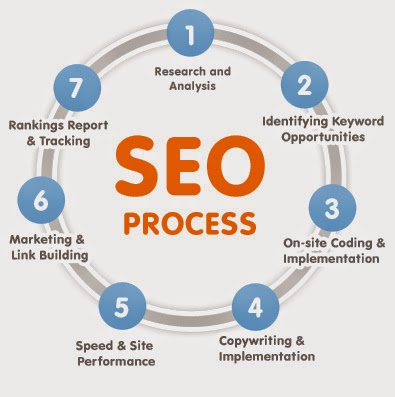
- Choose good keywords: Consider the number of searches for each term to find your best keywords. You can use Google Trends to define your strategy natural Google rankings.
- Request competition: Use keyword planner tool from Google Adwords
- Measures density of keywords: Use Internet Ninja Tool
- Use keywords: Use keywords in your texts, labels & categories. The first 200 words of each page are worth more, so it's good idea to intro summarizing the article.
- Keywords in titles and bold: You can use keywords to create titles for your content. If you highlight some bold on every item it easier to put Google list.
- Measures & analyzes your rankings for different keywords: Check your ranking on search engines for all your keywords. You can use the following free tool to install on your computer: CuteRank will tell the page number where you keywords in Google for each search.
- Meta description and title: Define for each page of your site a description and a title in the Meta tags of each <head> header. These are the titles and descriptions will look in Google and you intend to attract attention. If you are using WordPress you can use such as All in One SEO Pack . You will have a new form of SEO article in each edition.
- URL friendly and edited: Uses a writing system other than as your URL titles. You can shorten and edit to contain the largest number of keywords. In WordPress you can activate this feature in Settings, and you can edit each URL in editing each article.
- Creating and sending sitemap to search engines: Sitemaps help search engines to index your site and keep them updated in cache. Google and Bing have their own pages to send them your files. You can use XML Sitemaps Generator
- Automates sending 10 sitemaps: As sitemap submissions should do so whenever there is a change, it is best to automate it. With WordPress you can do with the plugins Google XML Sitemaps
- Transcribe your video content: The content of your videos or is not indexed by Google so it's good idea to text transcript and if you can find space.
- Favicon: The favicon is the little logo that appears in each tab and favorites and identifies each web. You can create your own and upload it to your template: http://www.favicon.cc/
- Avoid the use of cookies: unnecessary requests and problems with data privacy.
- Use rel = "author": Sets the authorship of your postings and displays the image of the author in search engines. It will help to draw the attention of your items and give them personality in Google.
- Title and Description: Includes all images in the ALT and TITLE tags. If search engines do not know what they are and cannot index them. If you're really lazy you can use SEO Friendly Images in WordPress to fill automatically.
- Specifies size: Always define the size of the images, either in Html tags with their width and height, or WordPress to publish. If the browser does not change the page size to the completed image and not all will be well until fully charged. Google wants you from the first moment our sizes are going to be, do not get older look.
- Not scale images in Html: Decide the size of each image in the article and upload it to that size.
- Optimizing images for the Web: Use a compressor or save for Web in Photoshop. No maximum image quality is needed for web and images occupy much data download. We want the page to load as quickly as possible.
- Combine images using CSS sprites: If your template or design uses many small images together, it is recommended that you combine into a single image and define the links using CSS sprites.
- Diversified Anchor text: These are the words you can click to visit your website. We try to link us descriptively, using keywords and not always the same, but varying them, making them look as natural recommendations. You can use: Backlink Anchor Text Analysis
- Check broken links. Google hates us if we visit links that do not work. We must help all our links and check regularly every week. With this online tool is simple and will tell us which do not work: Internet Marketing Ninjas
- Avoid redirects: Both in our site as a link when other pages. The above tool will also tell us that links have to be redirected to another address and suggests that steps Let's cut.
- Finding broken links: We may use a WordPress plugin to warn us when it stops working link: Broken Link Checker
- Know the PageRank: It is the assessment made by Google from 0 to 10 for each site on its position and authority. Meet and measured the evolution of your PageRank and sites that link or offer you link exchange. You can use http://pgchecker.info
- No malicious links or illegal content: Google penalizes pages that link content with virus or declared pirate.
- Find where your competition: Learn from your strategy while you find new ways to get links and improve positioning.
- Uses internal links: Search where noted other parts of your website and get used to naturally link your articles together.
- Original texts: Make sure all your texts are original. If not Google be the first to know and negatively marked out your site. You can use Copyscape.
- No-index our duplicate content’s: Add the no-index tag on our pages where repeated our content goes: category, file dates and labels. With All in One SEO Pack WordPress we can configure.
- No full text on home page: We will not include the full text of the articles in the front page of our blog; only a portion of sample and a Read More link But Google will have duplicated the same texts and item if alone will no longer have exclusive content.
- Meta Description and Title without repeating: The descriptions for search engines we cannot have any because it would create another conflict repeated seekers.
- Canonical URL: Make sure your web address is canonical: http://gmcsolution.com and http://www.gmcsolution.com
- The same design for web and mobile is preferable to use an adaptive or Responsive design that allows us to have the same design for all devices. If we have two different versions, search engines will find duplicate content and having two parallel copies of the site.
This is default featured slide 1 title
Go to Blogger edit html and find these sentences.Now replace these sentences with your own descriptions.This theme is Bloggerized by Lasantha Bandara - Premiumbloggertemplates.com.
This is default featured slide 2 title
Go to Blogger edit html and find these sentences.Now replace these sentences with your own descriptions.This theme is Bloggerized by Lasantha Bandara - Premiumbloggertemplates.com.
This is default featured slide 3 title
Go to Blogger edit html and find these sentences.Now replace these sentences with your own descriptions.This theme is Bloggerized by Lasantha Bandara - Premiumbloggertemplates.com.
This is default featured slide 4 title
Go to Blogger edit html and find these sentences.Now replace these sentences with your own descriptions.This theme is Bloggerized by Lasantha Bandara - Premiumbloggertemplates.com.
This is default featured slide 5 title
Go to Blogger edit html and find these sentences.Now replace these sentences with your own descriptions.This theme is Bloggerized by Lasantha Bandara - Premiumbloggertemplates.com.
Thursday, June 5, 2014
33 Steps for SEO and improve your search engine positioning
Wednesday, June 4, 2014
21 SEO tips for beginners to enhance your visibility in Google. 100% guaranteed!
- Write proper title for your page
- Use title Meta tag
- Use Meta description and keywords Meta tags
Optimize images
- Use H1 tag at least once in a page
- Address search engine friendly URLs
- Create XML sitemap
- Sign up for Google Analytics and Google Webmaster Tools
- Create Robots.txt file
- Write at least 200 words content for each page
- Develop a blog for your website
- Write at least 3 post per week
- Minify CSS files
- Minify JavaScript files
- Compressing resources with G-zip or deflate
- Develop a content architecture to sweep Google
- Use long tail keywords
- Choose keywords to users of Google
- Keywords: Analyze thoroughly the pillars of your blog
- Get inbound links without selling your soul to the devil or get banned by Google.
- Identify great opportunities for link building
Monday, June 2, 2014
15 essential SEO tips for your website
- The content is the most important: This is the first law, at least for Google; if your blog has good content that is of great interest to the user will be irretrievably located between the first posts soon. Why? Simply because users will follow and subscribe to your blog if you are interested in what they are reading and are responsible to share your posts with others through social networks, and so spread your content as a viral agent (wait, that does not It sounded great ...).
- Updated Site: Having your website updated with new content allows search engines to detect your site remains active and therefore take this into account as part of their algorithm for placement in a better position, so this would result in higher user traffic. If you can keep your site updated daily (or more than you can) you take into account as a relevant site (obviously if your material is of interest to the user). Get to read people recommending at least, publish a few posts a month. Of course two is better than nothing, but still very little and those types of blogs are not very laureates. Cases of successful blogs share the characteristic publish at least one post every two days.
- Improve speed of your website: This is one of the most decisive actions that are part of the Google algorithm that determines the location of your site (along with other actions that do). Google takes into account the time it takes for your blog to load, and if this is a long time Google guys do not have one of the best options. So you should take some precautions to improve the load time best, taking care of the weight of the images you use, avoiding resizing of images, not to abuse the plugins, etc... PageSpeed Insights is an excellent tool that Google provides for help you troubleshoot your site analyzing it and telling you that you must take action.
- Keywords in bold or italics: This is also one of the most important in positioning the pages of your website out. Never mind that Google update can make in the future, the keywords are the key element of any search (how else would find a page without a keyword?). Nothing is confirmed by Google, but some people advise that your articles contain 3% of keywords (some say between 2% and 5%). Do not overdo with it or could penalize you. Finally, it is advisable to put keywords in bold and italics to indicate to the browser that it is a relevant word.
- Use synonyms of keywords: With the latest Google algorithm, Hummingbird, you also require the use of synonyms of those keywords in the subject in question. This is because Google figures out how to provide the best results possible by interpreting more complex queries and more efficient results.
- Create sitemaps for your website: Create an XML document to facilitate the search the location of all pages of your website to ensure the absolute indexing and the search robot (like Googlebot) will not miss anything. This XML file can create it yourself using a text editor such as notepad, or in case you have a blog using WordPress or Blogger accounts with several plugins that will do the work for you automatically. Also become a HTML sitemap intended for users to facilitate navigation of your site and all your posts. This also accounts for plugins to be responsible for do it automatically or you can do it yourself on a page that meets all the links of the pages of your site.
- Uses social networks: Using social media is very important to make yourself known in the vast world of internet and one of the most used and important practice at the time to let us know. This type of search engine optimization practices is called "Off Page", which would be all that you do "off the page". Get yourself an account of the major social networks (FaceBook, Twitter, Google+, etc...), this could attract more users because your readers can share your articles through your circle of friends and these would be potentially interested. Also this allows you to keep them informed of your latest updates to your online business with products you offer, or in the case of your articles. This is more a personal opinion that I take the audacity to advise, but do not use your social media accounts on your site to post where you are eating and you asked to take, it is likely that some other user gets fed up and leave you to follow.
- Use "title" Tags: The data in the form of title in the "title" label will provide information to the user on the page of your website, i.e. you have to offer (try that is not too extensive). This will not help directly to Google locate you in a better position, but will help the user decides to access your site if the search words match he made you put in the title "title". So "Buy and sell used items - Best value" is the title of the page that the search engine will show the user, and if the keywords match the bold redial for the user in question you see what page is he is looking for. The labels "title" tags are inside other called "head". Here I will show how embedded: <head><title> title you want </ title> </ Head>
- Use Meta tags "description": This serves the same function as above but in a more comprehensive form. Meta tags "description" will give the user a more comprehensive and descriptive information about the page, causing the potential interest of the surfer to enter into your page. Note that it is best that each page of your site counts with a description. Meta tags go inside the top of the page exactly as in the case of "title". To see it better: <head><meta name="description" content=" "></ Head>
- SEO friendly URLs: The SEO friendly URLs help or semantic search engines, through their robots spiders to crawl your pages more easily. Also, if the URL is long and "ugly" may cause some reluctance to the user, causing not enter our site. So file names and categories of files on your website easy to remember and track names. Finally, do not use capital letters in the directions, and if you want you can separate words with a hyphen.
- Use webmaster tools: Major search engines offer free tools for webmasters. This will help to improve the performance of your site, giving you valuable data from your pages (if they violate some standard), showing how users come to your site (which means), identifying problems that hinder crawling search engines, etc.. But if you want something more professional you may try Search metrics is a powerful tool that provides you with all the data and analysis of your website and your competitors, so you can face the best strategy. You can choose a free version or another version of complete payment.
- Positioning your pages or back links (link building): The use of relevant authority sites link to your page helps (a lot) to the position of your site in search engines. But you know that there is any link without any authority sites or sites of any subject foreign to your blog. When we speak of authority we mean the Page Rank of that site available. When the browser detects an authority site that is subject and share your links with your site, the search engine will position your site as a relevant option for the user.
- Internal links: Internal links will help users to have more direct access to certain items that may be "lost" among all your published posts. It is important that if you're talking on a particular topic and make a statement about another topic that you have posted on your blog, you should link the "other issue" with the item you're developing. Thus users will approach your other posts that they might not have found laziness. So try to link your posts to mention each other on the issue, as long as they make sense.
- Promote your blog: You can participate in forums and make a good reputation in the community. Also can, and this is very common, publish articles on other sites with the same theme. In some places you will see in the section "Contact" administrator gives you the opportunity to publish on your site, and obviously you would you take credit for this article (with your name as the author and a link directing to your site web). Your blog or website is your product and you should go out and "sell" promoting you among those who make up the community of your niche.
- Never recourse to the Black Hat: Well, this is more than technical advice to keep positioning. The Black Hat are unethical techniques that are penalized by Google, taking you right to the bottom of the list of results in other cases will be removed from your database (that horror). Do not try and fool them do not bother with unethical practices, such as: keyword fill some article excessively (the same word many times in bold), using titles that mislead the user to access to your page, use words hidden keys that have nothing to do with the topic of your site, create spam sites to fill links, etc..
Friday, May 30, 2014
Value of Link Building in SEO world
What is Web Optimization?
- For both small and large companies, PPC allows them to target a large group of people at a fraction of the cost of conventional advertising.
- The SEM is the tactic of online marketing more direct and immediate results.
- Establishes a direct connection between potential customers and their business (their website).
- Search engines are the most desirable ways for people to find Web sites. Just over 80% of traffic comes from search engines.
- All methods of pay per click marketing and local search can help grow their business.
- Approximately 60% of users shopping online depending on the search engine result.
- Analysis and Keyword Research
- Optimization of anchor text (text anchors)
- Keyword Density (keywords)
- Tags title (optimization)
- Shipping Sitemap
- Verification with search engine webmaster tools for Google, Yahoo and Bing
- Alt Tag Optimization
- 301 Permanent Redirect
- Implementation of Analytics
- The link building: Link Building Process refers to the method of building quality links to your web site and partner sites, which helps to achieve better positions in SEPRS and therefore, visitors to your site.
Trick to increase visits to your website
- Use Authorship for your Web Page
- Do not change Titles frequently (it will lose positions of your Web Page)
- You can change the descriptions of your Web Pages (remember, at most 156 characters)
- You have to write meaningful Titles for your webpages
- Your Title shouldn't be more then 66 characters
- You have to write meaningful & non-promotional Descriptions for your webpages
- Your Meta Description shouldn't be more then 156 characters.
- You can use Symbols in the description of Meta Tags
Thursday, May 29, 2014
How to protect your website from Negative SEO
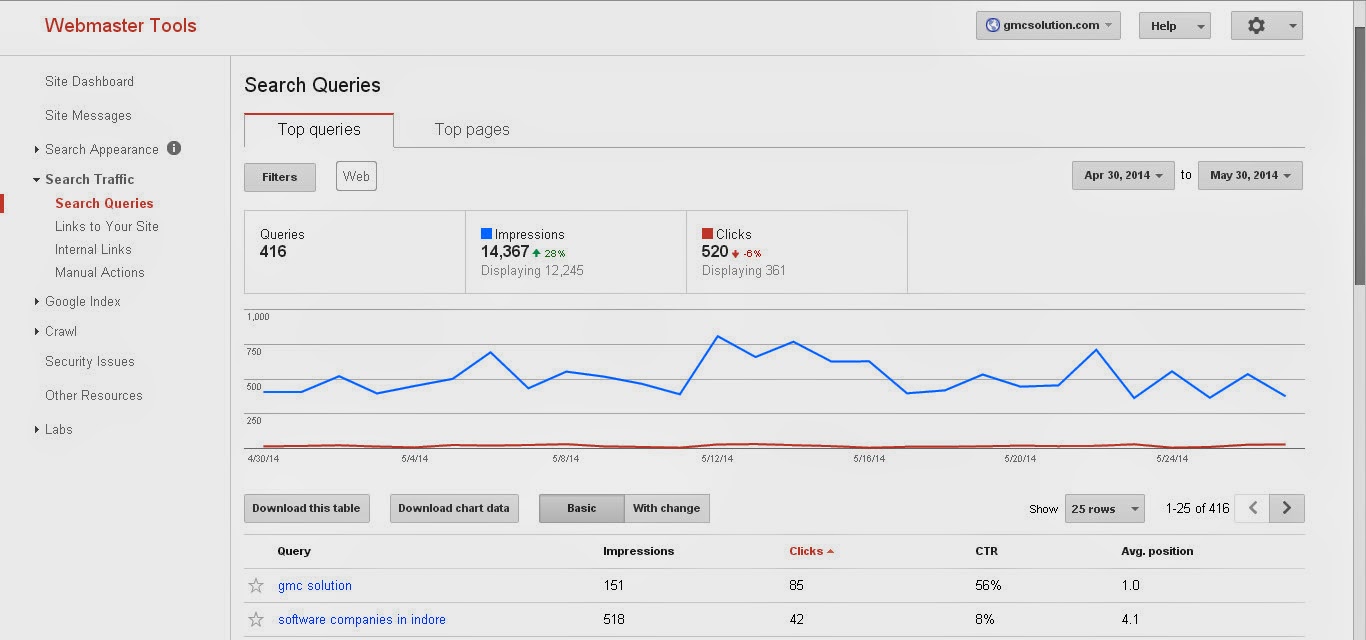
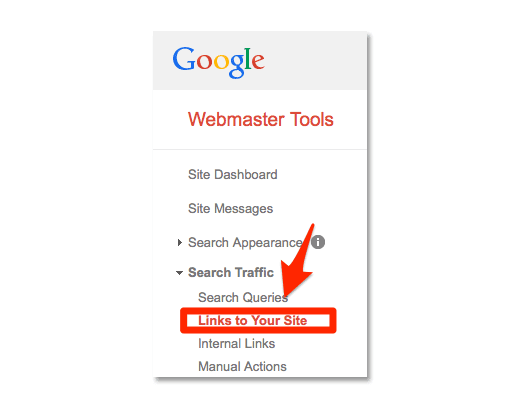
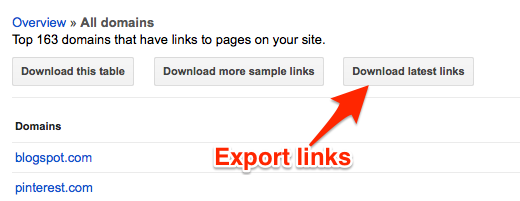
- From Webmaster Tools.
- With tools like Ahrefs: The latter is the very best to analyze your inbound links. In the next picture you can see that from the month of March the pages linking me suspiciously increase.
- Many links are on pages erotic themes disreputable
- The vast majority of links are in comments in blogs or directories WordPress
- Contacting the webmaster to delete the link (complicated)
- Telling Google what are the links you do not want to take into account